Class: QgsLayoutItemPropertiesDialog
A dialog for configuring properties like the size and position of layout items.
This is usually used only when constructing new layout items, allowing users to precisely enter their sizes and positions.
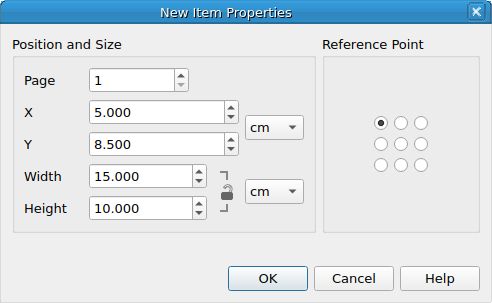
QgsLayoutItemPropertiesDialog
List of all members, including inherited members
Class Hierarchy
Base classes
Constructor
Methods
Returns the current item position defined by the dialog. |
|
Returns the item size defined by the dialog. |
|
Returns the page number for the new item. |
|
Returns the item reference point defined by the dialog. |
|
Sets the item position to show in the dialog. |
|
Sets the item size to show in the dialog. |
|
Sets the layout associated with the dialog. |
|
Sets the item reference point defined to show in the dialog. |
- class qgis.gui.QgsLayoutItemPropertiesDialog[source]
Bases:
QDialog- __init__(parent: QWidget | None = None, flags: Qt.WindowType = Qt.WindowFlags())
Constructor for
QgsLayoutNewItemPropertiesDialog.- Parameters:
parent (Optional[QWidget] = None)
flags (Qt.WindowType = Qt.WindowFlags())
- itemPosition(self) QgsLayoutPoint[source]
Returns the current item position defined by the dialog.
See also
- Return type:
- itemSize(self) QgsLayoutSize[source]
Returns the item size defined by the dialog.
See also
- Return type:
- referencePoint(self) QgsLayoutItem.ReferencePoint[source]
Returns the item reference point defined by the dialog.
See also
- Return type:
- setItemPosition(self, position: QgsLayoutPoint)[source]
Sets the item
positionto show in the dialog.See also
- Parameters:
position (QgsLayoutPoint)
- setItemSize(self, size: QgsLayoutSize)[source]
Sets the item
sizeto show in the dialog.See also
- Parameters:
size (QgsLayoutSize)
- setLayout(self, layout: QgsLayout | None)[source]
Sets the
layoutassociated with the dialog. This allows the dialog to retrieve properties from the layout and perform tasks like automatic conversion of units.
- setReferencePoint(self, point: QgsLayoutItem.ReferencePoint)[source]
Sets the item reference
pointdefined to show in the dialog.See also
- Parameters:
point (QgsLayoutItem.ReferencePoint)