Class: QgsLayoutItemComboBox
A combo box which displays items of a matching type from a layout.

QgsLayoutItemComboBox in the collapsed state
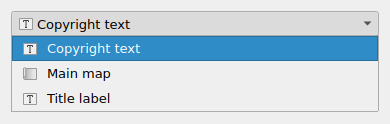
QgsLayoutItemComboBox in the expanded state
List of all members, including inherited members
Class Hierarchy
Base classes
Constructor
Methods
Returns |
|
Returns the item currently selected in the combo box. |
|
Returns the current layout containing the items shown in the combo box. |
|
Returns the list of specific items excluded from the combo box. |
|
Returns the item currently shown at the specified index within the combo box. |
|
Returns the layout item flags used for filtering the available items. |
|
Returns the filter for the item types to show in the combo box. |
|
Sets whether an optional empty layout item is present in the combobox. |
|
Sets the layout containing the items to list in the combo box. |
|
Sets a list of specific items to exclude from the combo box. |
|
Sets the currently selected item in the combo box. |
|
Sets layout item flags to use for filtering the available items. |
|
Sets a filter for the item type to show in the combo box. |
Signals
Emitted whenever the currently selected item changes |
- class qgis.gui.QgsLayoutItemComboBox[source]
Bases:
QComboBox- __init__(parent: QWidget | None = None, layout: QgsLayout | None = None)
QgsLayoutItemComboBox creates a combo box to display a list of items in a
layout. The items can optionally be filtered by type. Iflayoutis not set, no items will be shown untilsetCurrentLayout()is called
- allowEmptyItem(self) bool[source]
Returns
Trueif the model includes the empty item choice.See also
Added in version 3.8.
- Return type:
bool
- currentItem(self) QgsLayoutItem | None[source]
Returns the item currently selected in the combo box.
- Return type:
- currentLayout(self) QgsLayout | None[source]
Returns the current layout containing the items shown in the combo box.
See also
- exceptedItemList(self) list[QgsLayoutItem]
Returns the list of specific items excluded from the combo box.
See also
- Return type:
list[QgsLayoutItem]
- item(self, index: int) QgsLayoutItem | None[source]
Returns the item currently shown at the specified
indexwithin the combo box.See also
- Parameters:
index (int)
- Return type:
- signal itemChanged(item: QgsLayoutItem)[source]
Emitted whenever the currently selected item changes
- Parameters:
item (QgsLayoutItem)
- itemFlags(self) QgsLayoutItem.Flag[source]
Returns the layout item flags used for filtering the available items.
Returns
Noneif no flag based filtering is occurring.See also
Added in version 3.16.
- Return type:
- itemType(self) QgsLayoutItemRegistry.ItemType[source]
Returns the filter for the item types to show in the combo box.
See also
- Return type:
- setAllowEmptyItem(self, allowEmpty: bool)[source]
Sets whether an optional empty layout item is present in the combobox.
See also
Added in version 3.8.
- Parameters:
allowEmpty (bool)
- setCurrentLayout(self, layout: QgsLayout | None)[source]
Sets the
layoutcontaining the items to list in the combo box.See also
- setExceptedItemList(self, exceptList: Iterable[QgsLayoutItem])[source]
Sets a list of specific items to exclude from the combo box.
See also
- Parameters:
exceptList (Iterable[QgsLayoutItem])
- setItem(self, item: QgsLayoutItem | None)[source]
Sets the currently selected
itemin the combo box.- Parameters:
item (Optional[QgsLayoutItem])
- setItemFlags(self, flags: QgsLayoutItem.Flag)[source]
Sets layout item flags to use for filtering the available items.
Set
flagstoNoneto clear the flag based filtering.See also
Added in version 3.16.
- Parameters:
flags (QgsLayoutItem.Flag)
- setItemType(self, itemType: QgsLayoutItemRegistry.ItemType)[source]
Sets a filter for the item type to show in the combo box.
- Parameters:
itemType (QgsLayoutItemRegistry.ItemType) – type of items to show. Set to
QgsLayoutItemRegistry.LayoutItem to show all items.
See also