Class: QgsTableEditorWidget
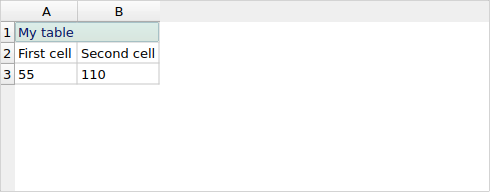
A reusable widget for editing simple spreadsheet-style tables.
Table content is retrieved and set using the
QgsTableContents class. The editor has support for table
foreground and background colors, and numeric formats.
Added in version 3.12.
QgsTableEditorWidget
List of all members, including inherited members
Class Hierarchy
Base classes
Constructor
Methods
Returns |
|
Returns |
|
Clears the contents of the currently selected cells. |
|
Returns a list of the columns associated with the current table selected cells. |
|
Deletes all columns associated with the current selected cells. |
|
Deletes all rows associated with the current selected cells. |
|
Expands out the selection to include whole columns associated with the current selected cells. |
|
Expands out the selection to include whole rows associated with the current selected cells. |
|
Returns |
|
Inserts new columns after the current selection. |
|
Inserts new columns before the current selection. |
|
Inserts new rows above the current selection. |
|
Inserts new rows below the current selection. |
|
Returns |
|
Merges selected table cells. |
|
Returns a list of the rows associated with the current table selected cells. |
|
Returns the background color for the currently selected cells. |
|
Returns the |
|
Returns the width (in millimeters) of the columns associated with the current selection, or 0 if an automatic column width is desired. |
|
Returns the foreground color for the currently selected cells. |
|
Returns the horizontal alignment for the currently selected cells. |
|
Returns the numeric format used for the currently selected cells, or |
|
Returns the height (in millimeters) of the rows associated with the current selection, or 0 if an automatic row height is desired, or -1 if the selection has mixed row heights. |
|
Returns the text format for the currently selected cells. |
|
Returns the horizontal alignment for the currently selected cells. |
|
Sets whether the table includes a header row. |
|
Sets the background color for the currently selected cells. |
|
Sets the cell contents |
|
Sets the column width (in millimeters) for the currently selected columns, or 0 for automatic column width. |
|
Sets the foreground color for the currently selected cells. |
|
Sets the horizontal alignment for the currently selected cells. |
|
Sets the numeric format to use for the currently selected cells. |
|
Sets the row height (in millimeters) for the currently selected rows, or 0 for automatic row height. |
|
Sets the text format for the selected cells. |
|
Sets the vertical alignment for the currently selected cells. |
|
Sets the configured column width for the specified column. |
|
Sets the contents to show in the editor widget. |
|
Sets the table headers. |
|
Sets the configured row height for the specified row. |
|
Returns the configured column width for the specified column, or 0 if an automatic width should be used for the column. |
|
Returns the current contents of the editor widget table. |
|
Returns the table header values. |
|
Returns the configured row height for the specified row, or 0 if an automatic height should be used for the row. |
Signals
Emitted whenever the active (or selected) cell changes in the widget. |
|
Emitted whenever the table contents are changed. |
- class qgis.gui.QgsTableEditorWidget[source]
Bases:
QTableWidget- __init__(parent: QWidget | None = None)
Constructor for QgsTableEditorWidget with the specified
parentwidget.- Parameters:
parent (Optional[QWidget] = None)
- signal activeCellChanged[source]
Emitted whenever the active (or selected) cell changes in the widget.
- canMergeSelection(self) bool[source]
Returns
Trueif a selection has been made which can be merged.Added in version 3.40.
- Return type:
bool
- canSplitSelection(self) bool[source]
Returns
Trueif a selection has been made which can be split.Added in version 3.40.
- Return type:
bool
- columnsAssociatedWithSelection(self) list[int]
Returns a list of the columns associated with the current table selected cells.
See also
- Return type:
list[int]
- deleteColumns(self)[source]
Deletes all columns associated with the current selected cells.
See also
- expandColumnSelection(self)[source]
Expands out the selection to include whole columns associated with the current selected cells.
See also
- expandRowSelection(self)[source]
Expands out the selection to include whole rows associated with the current selected cells.
See also
- hasMixedSelectionNumericFormat(self) bool[source]
Returns
Trueif the current selection has a mix of numeric formats.See also
- Return type:
bool
- isHeaderCellSelected(self) bool[source]
Returns
Trueif any header cells are selected.- Return type:
bool
- rowsAssociatedWithSelection(self) list[int]
Returns a list of the rows associated with the current table selected cells.
See also
- Return type:
list[int]
- selectionBackgroundColor(self) QColor[source]
Returns the background color for the currently selected cells.
If the selected cells have a mix of different background colors then an invalid color will be returned.
See also
See also
- Return type:
QColor
- selectionCellProperty(self) QgsProperty[source]
Returns the
QgsPropertyused for the contents of the currently selected cells.If the returned value is a default constructed
QgsProperty, then the selected cells have a mix of different properties.Added in version 3.16.
- Return type:
- selectionColumnWidth(self) float[source]
Returns the width (in millimeters) of the columns associated with the current selection, or 0 if an automatic column width is desired.
See also
- Return type:
float
- selectionForegroundColor(self) QColor[source]
Returns the foreground color for the currently selected cells.
If the selected cells have a mix of different foreground colors then an invalid color will be returned.
See also
See also
Deprecated since version 3.40: Use
selectionTextFormat()instead.- Return type:
QColor
- selectionHorizontalAlignment(self) Qt.AlignmentFlag[source]
Returns the horizontal alignment for the currently selected cells.
If the returned value contains both horizontal and vertical alignment flags, then the selected cells have a mix of different horizontal alignments.
See also
- Return type:
Qt.AlignmentFlag
- selectionNumericFormat(self) QgsNumericFormat | None[source]
Returns the numeric format used for the currently selected cells, or
Noneif the selection has no numeric format set.If the selected cells have a mix of different formats then
Nonewill be returned.See also
See also
- Return type:
- selectionRowHeight(self) float[source]
Returns the height (in millimeters) of the rows associated with the current selection, or 0 if an automatic row height is desired, or -1 if the selection has mixed row heights.
See also
- Return type:
float
- selectionTextFormat(self) QgsTextFormat[source]
Returns the text format for the currently selected cells.
Returns an invalid
QgsTextFormatif the selection has mixed text format.Added in version 3.16.
- Return type:
- selectionVerticalAlignment(self) Qt.AlignmentFlag[source]
Returns the horizontal alignment for the currently selected cells.
If the returned value contains both horizontal and vertical alignment flags, then the selected cells have a mix of different vertical alignments.
See also
- Return type:
Qt.AlignmentFlag
- setIncludeTableHeader(self, included: bool)[source]
Sets whether the table includes a header row.
- Parameters:
included (bool)
- setSelectionBackgroundColor(self, color: QColor | Qt.GlobalColor | int)[source]
Sets the background color for the currently selected cells.
See also
See also
- Parameters:
color (Union[QColor, Qt.GlobalColor, int])
- setSelectionCellProperty(self, property: QgsProperty)[source]
Sets the cell contents
QgsPropertyfor the currently selected cells.Added in version 3.16.
- Parameters:
property (QgsProperty)
- setSelectionColumnWidth(self, height: float)[source]
Sets the column
width(in millimeters) for the currently selected columns, or 0 for automatic column width.See also
- Parameters:
height (float)
- setSelectionForegroundColor(self, color: QColor | Qt.GlobalColor | int)[source]
Sets the foreground color for the currently selected cells.
See also
See also
Deprecated since version 3.40: Use
setSelectionTextFormat()instead.- Parameters:
color (Union[QColor, Qt.GlobalColor, int])
- setSelectionHorizontalAlignment(self, alignment: Qt.AlignmentFlag)[source]
Sets the horizontal alignment for the currently selected cells.
See also
See also
Added in version 3.16.
- Parameters:
alignment (Qt.AlignmentFlag)
- setSelectionNumericFormat(self, format: QgsNumericFormat | None)[source]
Sets the numeric
formatto use for the currently selected cells.Ownership of
formatis transferred to the widget.See also
- Parameters:
format (Optional[QgsNumericFormat])
- setSelectionRowHeight(self, height: float)[source]
Sets the row
height(in millimeters) for the currently selected rows, or 0 for automatic row height.See also
- Parameters:
height (float)
- setSelectionTextFormat(self, format: QgsTextFormat)[source]
Sets the text
formatfor the selected cells.Added in version 3.16.
- Parameters:
format (QgsTextFormat)
- setSelectionVerticalAlignment(self, alignment: Qt.AlignmentFlag)[source]
Sets the vertical alignment for the currently selected cells.
See also
See also
Added in version 3.16.
- Parameters:
alignment (Qt.AlignmentFlag)
- setTableColumnWidth(self, column: int, width: float)[source]
Sets the configured column
widthfor the specifiedcolumn. Setwidthto 0 if an automatic width should be used for the column.This should be called after a call to
setTableContents().See also
- Parameters:
column (int)
width (float)
- setTableContents(self, contents: Any)[source]
Sets the
contentsto show in the editor widget.See also
- Parameters:
contents (Any)
- setTableHeaders(self, headers: Iterable[Any])[source]
Sets the table
headers.See also
- Parameters:
headers (Iterable[Any])
- setTableRowHeight(self, row: int, height: float)[source]
Sets the configured row
heightfor the specifiedrow. Setheightto 0 if an automatic height should be used for the row.This should be called after a call to
setTableContents().See also
- Parameters:
row (int)
height (float)
- tableColumnWidth(self, column: int) float[source]
Returns the configured column width for the specified
column, or 0 if an automatic width should be used for the column.- Parameters:
column (int)
- Return type:
float
- tableContents(self) Any[source]
Returns the current contents of the editor widget table.
See also
- Return type: