Class: QgsSymbolsListWidget
A widget which presents symbol-level properties (such as size), and allows selection of symbols from stored styles.
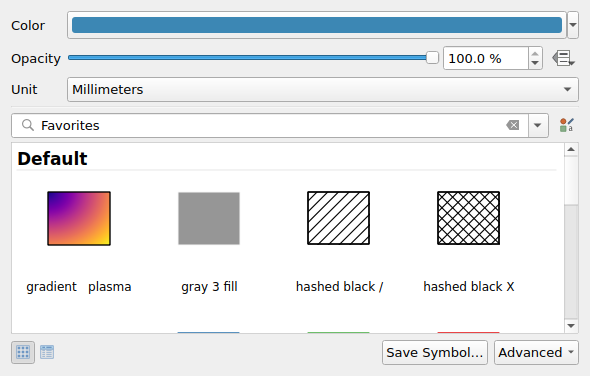
QgsSymbolsListWidget
List of all members, including inherited members
Class Hierarchy
Base classes
Constructor
Methods
Returns the context in which the symbol widget is shown, e.g., the associated map canvas and expression contexts. |
|
Returns the vector layer associated with the widget. |
|
Sets the context in which the symbol widget is shown, e.g., the associated map canvas and expression contexts. |
|
Signals
Emitted when the symbol is modified in the widget. |
- class qgis.gui.QgsSymbolsListWidget[source]
Bases:
QWidget- __init__(symbol: QgsSymbol | None, style: QgsStyle | None, menu: QMenu | None, parent: QWidget | None, layer: QgsVectorLayer | None = None)
Constructor for QgsSymbolsListWidget.
- context(self) QgsSymbolWidgetContext[source]
Returns the context in which the symbol widget is shown, e.g., the associated map canvas and expression contexts.
See also
- Return type:
- layer(self) QgsVectorLayer | None[source]
Returns the vector layer associated with the widget.
- Return type:
- setContext(self, context: QgsSymbolWidgetContext)[source]
Sets the context in which the symbol widget is shown, e.g., the associated map canvas and expression contexts.
- Parameters:
context (QgsSymbolWidgetContext) – symbol widget context
See also