Class: QgsSymbolSelectorDialog
A dialog that can be used to select and build a symbol.
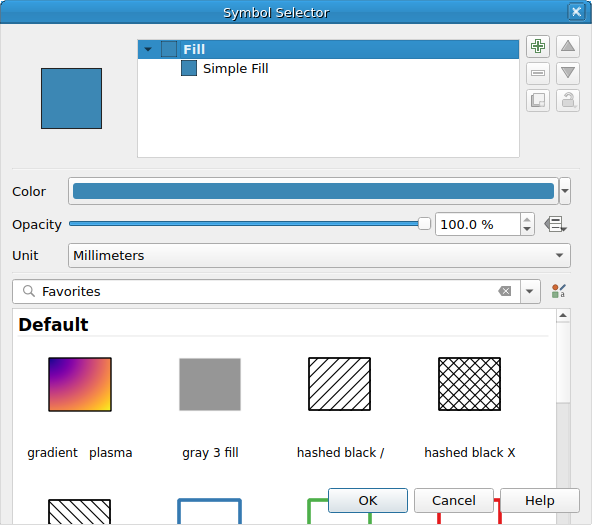
QgsSymbolSelectorDialog
List of all members, including inherited members
Class Hierarchy
Base classes
Constructor
Methods
Returns menu for "advanced" button - create it if doesn't exist and show the advanced button |
|
Returns a reference to the dialog's button box. |
|
Alters tree and sets proper widget when Layer Type is changed |
|
Returns the context in which the symbol widget is shown, e.g., the associated map canvas and expression contexts. |
|
Duplicates the current symbol layer and places the duplicated layer above the current symbol layer |
|
Sets the context in which the symbol widget is shown, e.g., the associated map canvas and expression contexts. |
|
Returns the symbol that is currently active in the widget. |
|
Slot to update tree when a new symbol from style |
|
Signals
Emitted when the symbol defined in the dialog is modified. |
- class qgis.gui.QgsSymbolSelectorDialog[source]
Bases:
QDialog- __init__(symbol: QgsSymbol | None, style: QgsStyle | None, vl: QgsVectorLayer | None, parent: QWidget | None = None, embedded: bool = False)
Constructor for QgsSymbolSelectorDialog.
- advancedMenu(self) QMenu | None[source]
Returns menu for “advanced” button - create it if doesn’t exist and show the advanced button
- Return type:
Optional[QMenu]
- buttonBox(self) QDialogButtonBox | None[source]
Returns a reference to the dialog’s button box.
Added in version 3.10.
- Return type:
Optional[QDialogButtonBox]
- changeLayer(self, layer: QgsSymbolLayer | None)[source]
Alters tree and sets proper widget when Layer Type is changed
Note
The layer is received from the LayerPropertiesWidget
- Parameters:
layer (Optional[QgsSymbolLayer])
- context(self) QgsSymbolWidgetContext[source]
Returns the context in which the symbol widget is shown, e.g., the associated map canvas and expression contexts.
See also
- Return type:
- duplicateLayer(self)[source]
Duplicates the current symbol layer and places the duplicated layer above the current symbol layer
- setContext(self, context: QgsSymbolWidgetContext)[source]
Sets the context in which the symbol widget is shown, e.g., the associated map canvas and expression contexts.
- Parameters:
context (QgsSymbolWidgetContext) – symbol widget context
See also