Class: QgsRasterAttributeTableWidget
The QgsRasterAttributeTableWidget class provides an
attribute table for rasters and methods to edit the table.
Added in version 3.30.
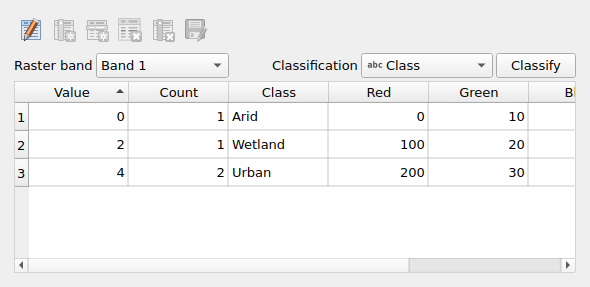
QgsRasterAttributeTableWidget
List of all members, including inherited members
Class Hierarchy
Base classes
Base class for any widget that can be shown as an inline panel. |
|
Constructor
Methods
Returns |
|
Save the changes in the raster attribute table. |
|
Set the editable state, it may trigger save changes if the attribute table has unsave changes. |
|
Sets the message bar associated with the widget. |
|
Sets the raster layer and an optional band number. |
Signals
This signal is emitted after a successful classify operation which changed the raster renderer. |
- class qgis.gui.QgsRasterAttributeTableWidget[source]
Bases:
QgsPanelWidget- __init__(parent: QWidget | None = None, rasterLayer: QgsRasterLayer | None = None, bandNumber: int = 0)
Creates a new QgsRasterAttributeTableWidget
- Parameters:
parent (Optional[QWidget] = None) – parent widget
rasterLayer (Optional[QgsRasterLayer] = None) – raster layer
bandNumber (int = 0) – optional initial selected band number (default to 0, which makes the widget use the first available RAT, if any)
- isDirty(self) bool[source]
Returns
Trueif the associated raster attribute table is dirty- Return type:
bool
- signal rendererChanged[source]
This signal is emitted after a successful classify operation which changed the raster renderer.
- setEditable(self, editable: bool, allowCancel: bool = True) bool[source]
Set the editable state, it may trigger save changes if the attribute table has unsave changes.
- Parameters:
editable (bool) – editable state
allowCancel (bool = True) – optional (default
True) flag to show cancel option in confirm save dialog.
- Return type:
bool
- setMessageBar(self, bar: QgsMessageBar | None)[source]
Sets the message
barassociated with the widget. This allows the widget to push feedback messages to the appropriate message bar.- Parameters:
bar (Optional[QgsMessageBar])
- setRasterLayer(self, rasterLayer: QgsRasterLayer | None, bandNumber: int = 0)[source]
Sets the raster layer and an optional band number.
- Parameters:
rasterLayer (Optional[QgsRasterLayer]) – raster layer
bandNumber (int = 0) – optional initial selected band number (default to 0, which makes the widget use the first available RAT, if any)